Control Your PC
in One Swipe
OrbitSwipe is a highly optimized standalone radial launcher for Windows that coordinates your apps, folders, dynamic system configurations, and active stats into one gorgeous, customizable glassmorphic interface.
Everything You Need,
One Swipe Away
Powerful features designed to make your Windows experience faster, more intuitive, and visually stunning.
Radial Launcher
Access everything instantly with a smooth, swipe-based circular menu. Opens right where your cursor is.
WinTop Manager
Pin any window to stay always on top while you work or game. Never lose sight of important windows.
Smart Search
Find apps, files, and tools instantly without opening the Start Menu. AI-powered suggestions.
Hardware Control
Adjust volume and brightness with fluid radial sliders. Visual feedback with smooth animations.
Workspace Groups
Launch your entire setup (apps, tools, folders) in one click. Perfect for different projects.
Drag & Drop
Add apps, links, and scripts effortlessly. Intuitive customization without complex settings.
Custom Glass Themes
Create or select from beautiful glass UI presets that adapt dynamically to your desktop. Fully customizable accents.
Auto-Hide Trigger
Activate from screen edges with hover. Configure delay, sensitivity, and trigger zones.
Power Manager
Lock, sleep, restart, hibernate, or shut down your PC with instant execution or scheduled countdown timers.
Color Picker
Built-in screen magnifier with hex/rgb copy and color history tracking.
Live System Stats
Track CPU, RAM, Network speed, and Battery directly from your launcher hub.
Global Hotkeys
Instantly trigger specific tools, apps, and macros with customizable shortcuts.
Power Under the Hood
Live System Stats
CPU, RAM, Battery, Network
Global Hotkeys
Fully customizable shortcuts
Auto-hide Trigger
Edge activation on hover
Multi-monitor
Works on any display
Color Picker Tools
Built-in magnifier & history
Script Execution
PowerShell, Python, Batch
Actual Launcher UI
Take a look at the real high-fidelity WPF Fluent interface running live on Windows 10/11.
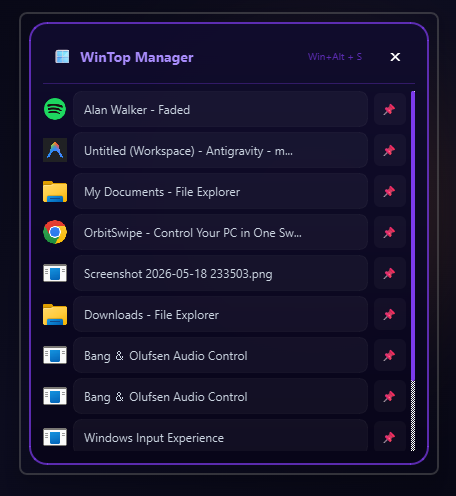
WinTop Manager
Stealth Always-On-Top Utility
Keep critical workspace tools or references strictly on top. Replicating Windows PowerToys WinTop, pin any active application window instantly as 'Always on Top' using customizable keyboard hotkeys.
Built Different
Zero Travel Time
Opens exactly where your mouse is. No reaching for corners or taskbars.
All-in-One Tool
Launcher + Window Manager + System Monitor in one elegant interface.
Faster Than Start Menu
Replaces the Start Menu with a smarter, quicker system.
Premium Experience
A visual experience that matches the quality of your workflow.
Lightweight & Efficient
Built for performance. No bloat, no telemetry, no background services draining your resources.
System Requirements
- Windows 10 or Windows 11 (64-bit)
- Fully Standalone Executable (No external runtimes required!)
- Minimal footprint: Zero installation required (Portable)
- Highly optimized: Works smoothly with minimal resources (4GB RAM suggested)
- No internet connection required after initial download
Activate Your OrbitSwipe Pro
Start with our generous 30-day free trial or unlock permanent control with the standalone Pro License.
30-Day Free Trial
Experience the fully featured OrbitSwipe standalone launcher completely free for 30 days.
- Access to all launcher modes (Stats & Media player)
- Custom premium glass accents generator
- Fully responsive double-ring simulator controls
- Quick-access Favorites & Toolbox tracks
- Lightweight standalone Windows executable
- Complete offline functionality (No background ads)
1-Year License
Enjoy unlimited access to all features of OrbitSwipe for a full year with regular software updates.
- 1 year of unlimited launcher runs
- Access to all launcher modes (Stats & Media)
- Custom premium glass accents generator
- Fully responsive double-ring controls
- Quick-access Favorites & Toolbox tracks
- Standard software updates for 1 year
- Standard email & technical support
Pro Lifetime Key
Permanently unlock OrbitSwipe on your device with lifetime access to all core launcher features.
- Lifetime unlimited launcher runs
- Access to all launcher modes (Stats & Media)
- Custom premium glass accents generator
- Fully responsive double-ring controls
- Quick-access Favorites & Toolbox tracks
- Flexible device switching support
- Lifetime standalone license updates
What People Are Saying
Perfect For
Every Workflow
Gaming
Adjust volume or pin apps without leaving your game. No alt-tabbing required.
Development
Launch your full dev environment instantly. IDEs, terminals, browsers in one click.
Productivity
Access tools without breaking focus. Keep your workflow uninterrupted.
Minimalists
Clean desktop with hidden edge trigger. Everything accessible, nothing visible.
Frequently Asked Questions
Everything you need to know about OrbitSwipe features, safety, licensing, and billing.
Upgrade Your
Windows Experience
Join thousands of users who have transformed how they interact with Windows.
Windows 10/11 • 64-bit • Easy install